


T-Life
4.6105.19K Reviews
App Specs
- Version
- Varies with Device
- Updated On
- License
- Free
- Downloads
- 10,000,000+
- Developer
- T-Mobile USA
- Categories
- Lifestyle
- Platform
- Android, iOS
Screenshots

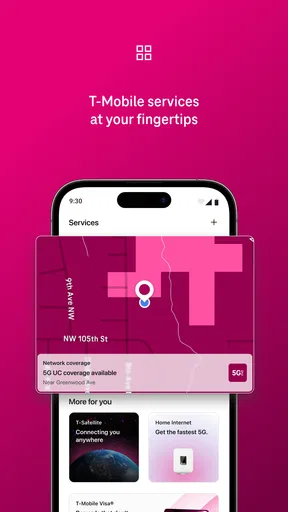
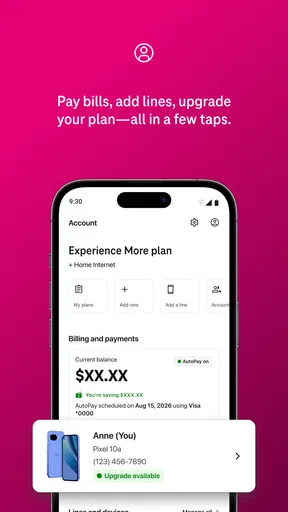
 Analysis by AppCompare
I judge T-Life by a practical standard: does it make the T-Mobile account and service tasks I already need to do easier to handle? As a free lifestyle app from T-Mobile USA, it is most useful when you are a T-Mobile customer who wants one mobile starting point for managing the relationship. It is not a general-purpose habit tracker or task planner, so I would not install it expecting the kind of productivity tools described in many lifestyle apps.
What an all-in-one carrier app is good for
The main appeal is convenience: instead of treating every account-related chore as a separate errand, you can begin in the app and see what T-Mobile makes available there. That is valuable when you want to check in on your service, handle an account task, or find your way to a relevant support option without first searching through email or a browser. The app is tied to T-Mobile, though, so its usefulness depends on your connection to that provider rather than on a broad set of tools for everyone.
I would think of it as a companion to your wireless account, not a replacement for every way of contacting the company. For a quick check while away from a computer, a phone app can be more convenient than signing in through a browser. For a complicated issue that needs careful explanation, I would still choose the support route that lets me communicate most clearly. Having an app available is helpful; it does not guarantee that every task will be quicker there.
A realistic reason to keep it installed
Imagine noticing a service-related question while you are out, with no laptop nearby. I would open the app first, look for the account or help path that fits the question, and decide whether I can resolve it there or need another support channel. That small workflow is the kind of everyday convenience a carrier app can offer: it gives you a place to start, rather than making you remember where to go each time.
There is also a useful habit in keeping the app for account errands while using your phone’s calendar or reminders for unrelated commitments. That keeps the jobs distinct. A carrier app can help with T-Mobile matters, but it should not become the place you rely on to organize work deadlines, shopping lists, or personal goals unless it actually supports those needs. I prefer to choose tools by purpose instead of expecting one app to manage my whole life.
Where it sits among the alternatives
Compared with signing in through a browser, a dedicated app is a sensible first stop when you are already using your phone and want a more direct route to T-Mobile tasks. Compared with calling support, it may be more convenient for a quick self-service attempt, while a conversation can be better when an issue is unusual or needs back-and-forth. Those options complement one another; I would not assume the app makes them unnecessary.
It is also different from independent budgeting, calendar, and productivity apps. Those tools are designed around organizing your time or money across different parts of life. T-Life has a narrower provider-specific role, which is a strength if you want a T-Mobile point of access and a limitation if you are looking for a neutral hub for multiple services. If you do not use T-Mobile, I would skip it; the central reason to install it simply does not apply.
Worth Reading Before You Choose

EA SPORTS FC Mobile 26 Is a Bigger Football Game, but It Takes Time

Flipboard Shows What News Apps Must Do Beyond the Feed

Switching to Android Auto Means Rethinking Your Driving Routine

Google Calendar Makes a Crowded Week Easier to Manage

Ludo King Makes the Most of the Minutes Between Plans

Baby Panda World Brings Quick Play to Modern Phones, but Its Game Library Feels Busy
Who is most likely to find it useful
I would recommend trying it if you are a T-Mobile customer who regularly handles account matters on a phone and prefers an app-based starting point. It is particularly easy to justify if you want to see whether your common errands can be handled without switching to a browser or beginning with a call. The best test is straightforward: install it, try the account task you actually make most often, and keep it only if that route feels convenient.
If you share responsibility for an account, or help a family member with their service, be deliberate about which account you are signed into before taking an action. That is a useful general precaution with any carrier account tool: convenience matters, but choosing the right account matters more. I would also avoid relying on any single access method for an urgent issue; knowing how to reach support another way gives you a backup if the app is not the right fit for the problem.
Getting Started with T-Life
Getting started is a breeze. After downloading T-Life, you're greeted with a sleek and colorful interface that just feels inviting. It's like the app is whispering, "Hey, let's get productive together!" Setting up your first tasks or goals is super straightforward, and I appreciate how the app doesn’t bombard you with too many options right off the bat.
Features that Stand Out
Now, onto the juicy stuff - the features. T-Life offers a variety of tools to keep you on track. From daily habit trackers to a calendar integration, it’s got all the essentials covered. But what really caught my eye was the motivational quotes feature. It’s like having a little cheerleader in your phone, always ready to boost your spirits when the going gets tough.
Another feature I found particularly useful is the analytics dashboard. It gives you a visual representation of your progress over time. Seeing those colorful charts fill up as you complete tasks is oddly satisfying, and it does wonders for keeping your motivation high.
Usability and Design
The design is clean, and navigation is intuitive. You won’t find yourself lost or confused, which is a huge plus in my book. The developers have clearly put a lot of thought into making the user experience as seamless as possible.
Customization is another area where T-Life shines. You can personalize your dashboard to fit your style, whether you prefer a minimalistic look or something more vibrant. It’s all about making the app work for you, rather than the other way around.
Final Thoughts
So, what's the verdict? If you're looking for an app to help you organize your life and keep you motivated, T-Life is definitely worth a shot. It’s user-friendly, visually appealing, and packed with features that actually help you stay on track. Plus, it adds a little fun to the often monotonous task of self-management.
In a world where productivity apps are a dime a dozen, T-Life stands out by keeping things simple yet effective. Give it a try and see how it can transform the way you manage your day-to-day tasks. You might just find it’s the digital companion you’ve been missing.
What to expect before installing
T-Life is free and rated for Everyone, so there is no purchase decision to make before trying it. Its 4.6 average comes from around 947 thousand ratings, with roughly 95 thousand written reviews, and it has passed 10 million installs. Those figures suggest that many people have tried it, but they do not tell me whether it will suit your account or solve a particular service issue; your own most common task is a better test.
The app has been available since June 6, 2016, and its role remains easiest to understand as a T-Mobile-specific companion. If you are deciding between installing it and using a browser, ask yourself how often you handle account matters on your phone. Frequent mobile users have a clearer reason to keep it; someone who rarely checks their account may be perfectly comfortable using the web or another support route when needed.
Small decisions that make it more useful
I would start by identifying one recurring account errand and using the app for that first, rather than exploring every screen without a goal. A focused trial makes it easier to tell whether the app genuinely saves effort. If the task is easy to find and complete, it earns a place on your phone; if you end up switching to a browser or support anyway, there may be little benefit for your routine.
For anyone helping another person, I would also make account access part of the setup conversation. Confirm whose account is open before reviewing details or making changes, and let the account holder stay involved in decisions. This is not a special trick so much as a sensible way to avoid mistakes when an app puts account actions within easy reach.
My final recommendation
The strongest case for T-Life is practical rather than broad: it gives T-Mobile customers an app-based place to begin with provider-related tasks. Its fit is much weaker for people seeking an all-purpose lifestyle organizer, or for anyone who does not use T-Mobile. I would try it if mobile access to your account would make an ordinary chore easier, while keeping browser and support options in mind for anything that calls for a different approach.
Pros
- User-friendly interface makes navigation easy.
- Extensive range of features for daily tasks.
- Customizable settings for personalized use.
- Seamless integration with other devices.
- Regular updates enhance functionality.
Cons
- Occasional glitches can disrupt usage.
- Heavy on battery consumption during use.
- Limited offline functionality available.
- Requires frequent permissions access.
- Ads can be intrusive in free version.
FAQs for T-Life
What is T-Life and how does it enhance productivity?
T-Life is a comprehensive productivity app designed to streamline your daily tasks and manage your time more effectively. It integrates features like task management, calendar syncing, and habit tracking to help users stay organized. With its user-friendly interface, T-Life aims to boost your productivity by providing tools that cater to personal and professional needs.
Is T-Life available for both Android and iOS platforms?
Yes, T-Life is available for download on both Android and iOS platforms. The app is designed to provide a seamless experience across devices, ensuring that all features are accessible regardless of your operating system. Users can download it from the Google Play Store or the Apple App Store.
Does T-Life require a subscription, and are there any in-app purchases?
T-Life offers both free and premium versions. The free version includes basic features, while the premium version, available through a subscription, unlocks advanced tools and customization options. There are also optional in-app purchases that allow users to enhance their experience further by adding specific features or functionalities.
How secure is my data on T-Life?
T-Life prioritizes user privacy and data security. The app employs robust encryption to protect your information. Additionally, it offers options to secure your account with two-factor authentication. Regular updates are also provided to address any security vulnerabilities, ensuring your data remains safe and private.
Can T-Life be integrated with other productivity tools?
Yes, T-Life offers integration with various productivity tools and platforms. Users can sync their calendars from Google or Outlook, and connect with task managers like Trello or Asana. This flexibility allows users to create a comprehensive productivity ecosystem, enhancing their ability to manage tasks across different platforms efficiently.


